QSO Logging
08/09/2026
I'm newly back into amateur radio after a break, so the log itself is still thin (not many QSOs in there yet). But the station and the infrastructure behind it are ready, which felt like the right thing to get sorted first: I'd rather build the shelf before I start putting books on it.
In the past my logbook was a patchwork: a paper sheet on the desk, an ADIF file on the laptop, an export from one program that a second program refused to import cleanly. It worked, but it was never in one place, and it was never with me when I actually needed it.
What I wanted this time was a single log that lives on my own hardware, that I can reach from the shack, from the laptop, and from a field somewhere with only a phone in my pocket. That turned into a small project of its own, and I'm writing this partly as a note to my future self for when I inevitably forget how the pieces fit together.
A quick disclaimer: I'm not a professional sysadmin. I know enough Linux to be dangerous, as a hobby alongside radio, and a good chunk of what follows (especially the networking parts) I worked through with Claude AI, asking questions and testing things one step at a time rather than just copy-pasting a fix. I'll describe the shape of the setup below, without spelling out every internal address or configuration detail, partly for my own future reference, partly because this is a public blog and a logbook is still something worth not handing a roadmap to.
Wavelog
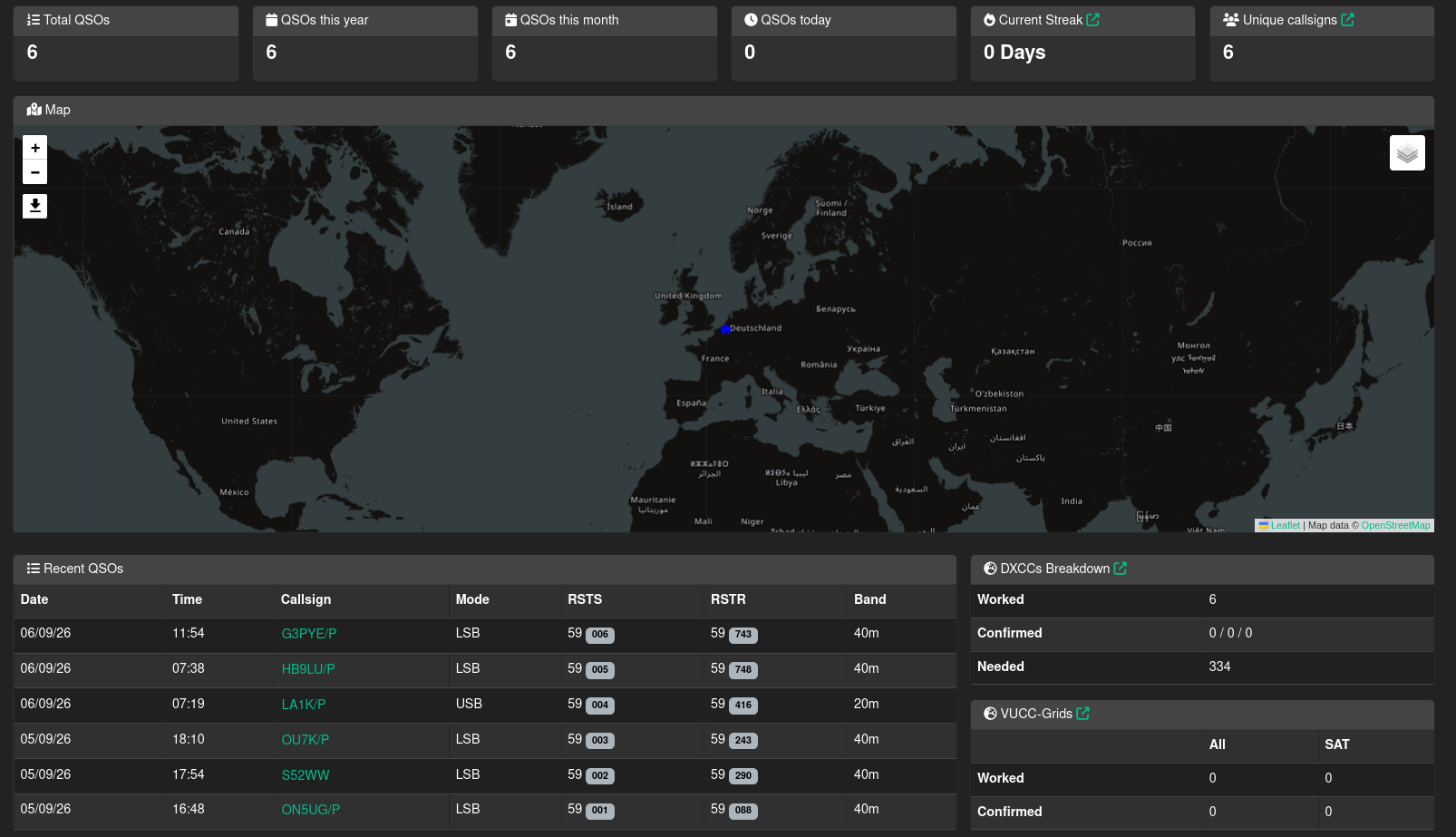
The logbook I chose is Wavelog, an open-source, self-hosted web logbook. It is a PHP application backed by a MariaDB database, and it does all the things I used to spread across three tools: ADIF import and export, LoTW and eQSL upload, QSL card tracking, award progress, an online callbook lookup, and a map of worked grids. Because it is a web app, the "client" is just a browser, so every device I own sees exactly the same log with no syncing to think about.
Where it runs
The server infrastructure itself wasn't built for Wavelog: it already existed as a hobby project of its own. I run a small home server that's been quietly running a handful of Docker containers for a while now, Home Assistant being the main one, alongside a few other bits and pieces. Wavelog was simply the newest container to move in. I also rent a small cloud server at Hetzner, which faces the public internet and hosts this blog. Splitting things this way means the home machine never has to be directly reachable from the internet: it has no ports open to the outside at all.
Here's roughly how it fits together:
One VPN to tie it together
All of it sits on a single WireGuard network: the home server, the Hetzner server, my desktop, my phone. WireGuard was an easy pick here: it's the VPN that's become the de facto standard in the self-hosting world, lightweight enough to run comfortably on a small home server and well supported on Android. The Hetzner machine has a static public address, which makes it a convenient fixed point for the other peers to find each other through.
The practical upshot is that "my server" is reachable from anywhere I am, not just from the home network. The home server never has to expose a port to the internet; if a device is on the VPN, it can talk to Wavelog, and if it is not, there is nothing to see.
Logging in the field
Wavelog has an Android app, and this is where the VPN really pays off. I bring up WireGuard on the phone, open the app, and I am logging into the same database that sits at home (live, from a hilltop or a car park), with no offline file to reconcile later. By the time I am home the contacts are already in the log, already uploaded, already on the map.
Getting the phone to cooperate took some doing. Android quietly blocks apps from connecting over plain, unencrypted HTTP (no useful error, just a generic timeout), so the home instance needed a proper HTTPS certificate, reachable only over the VPN, without ever opening a port to the outside world. I got there with Caddy as a reverse proxy on the Hetzner box, which already handles the certificate for this blog via Let's Encrypt, so I gave it a second site definition that only accepts connections coming from inside the WireGuard network and forwards everything else to the home server over the tunnel. I paired that with a small internal DNS override so devices on the tunnel resolve the address to the private route instead of the public one. It sounds simple written like that; getting every layer (the proxy, the DNS override, and the phone's own caching) to actually agree with each other took a genuinely educational back-and-forth with Claude AI, reading logs together and testing one change at a time. I came out of it understanding my own network noticeably better than when I went in, which was a nice bonus on top of just getting the app to work.
Automatic rig data with WavelogGate
At the desk I run WavelogGate, a small bridge that reads the radio's CAT data and feeds it into Wavelog's real-time API. In my case the CAT link is the same network connection to the transceiver that I use with wfview for remote operating, so WavelogGate can pick up frequency and mode over the network without anything extra plugged in.
The effect is that when I start a new QSO, the band, frequency and mode are already filled in from whatever the radio is actually doing. I type the callsign, add a note if there is one, and save. It removes exactly the fields I used to get wrong when logging in a hurry.
Backups
A logbook you cannot restore is not really a logbook. A cron job on the home server dumps the database on a schedule, keeps a rotation of recent copies, and pushes one off the machine so there is a copy that does not depend on that little PC still being alive. The Hetzner server runs its own routine using restic (a solid, open-source backup tool that encrypts everything before it leaves the machine), pushing an encrypted snapshot to separate storage on a schedule, with old snapshots pruned automatically so it doesn't grow forever. Both copies got a real test restore before I trusted either of them.
Where this leaves me
The whole thing is unremarkable to use, which is the point. Every contact lands in one database on hardware I control, with the radio filling in the details it knows and a cron job quietly making sure none of it can vanish. None of it required me to be an expert going in, just patience, a willingness to ask "why" when something didn't work, and a good AI assistant to work through it with. Now I just need to actually get on the air and fill the log up.
73, ON4DMD
Comments